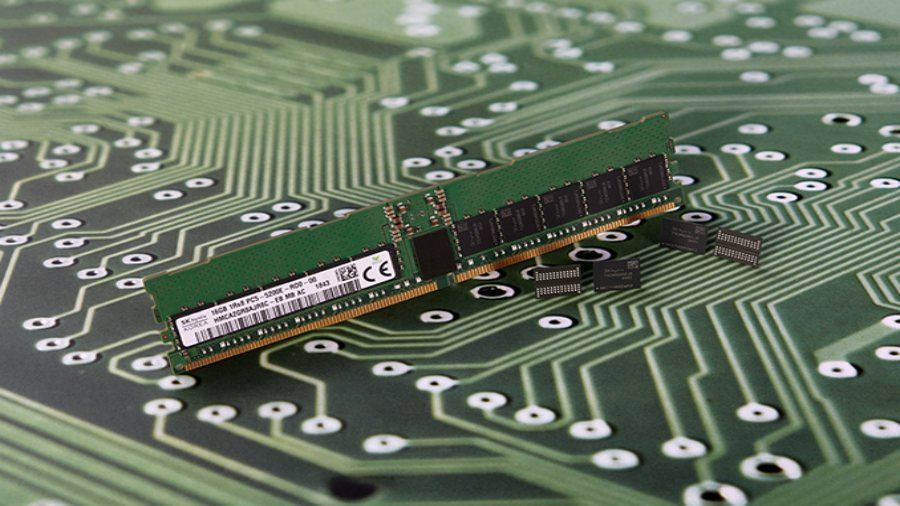
Sk Hynix announced on Thursday that it had completed the development of the world’s first 16 GB DDR5 memory chips. It is touted as the first DRAM that is compliant with JEDEC memory standards which have not been published yet.
The newly developed chips are based on Sk Hynix’s second generation 10nm-class process technology which is also known as 1Ynm. However, the company has not provided any details about the die size used for making the DDR5 RAM.
On the upgrade front, it delivers 5200 MT/sec/pin data transfer rate as compared to 3200 MT/s transfer rate, supported by the currently used DDR4 RAM. This increased rate makes it 60% faster than DDR4 memory chips.
Another major upgrade is a 9% decrease in the operating voltage as the upcoming RAM operates at 1.1 volts. According to the company, DDR5 RAM lineup would consist of memory chips having 8 GB, 16 GB and 32 GB capacities and the data transfer rate could be between 3200 MT/s and 6400 MT/s.
The company has said that the full-fledged mass production of DDR5 Memory chips will begin in 2020.
In addition to the memory chip, SK Hynix has also presented DDR5 registered DIMM (dual in-line memory module) – DDR5-5200 RDIMM. It offers a peak memory bandwidth of 41.6 GB per second which is close to bandwidth obtained by overclocking DDR4 modules to their maximum limits.
The Ryzen 2700 and 2600 are the two slightly slower eight-core and six-core counterparts to the AMD Ryzen 2700X and 2600X. Their lower clock speeds correspond to lower prices but, unlike with Intel’s lower-tier processors, they still retain an unlocked multiplier for easy overclocking. As such, they could potentially be the better option for those willing to overclock.
In particular, the 2600 could be an ideal mid-range gaming choice. It costs just £166 yet offers six-cores capable of processing 12 threads at a time and a peak clock speed of 3.9GHz.
Otherwise, these two chips offer the same core features as their X brethren. These include a new 12nm manufacturing process, Precision Boost 2 and XFR2. Read on to see if they deliver on their promise.
AMD Ryzen 2700 & 2600 – Features
In essence, the only thing separating the 2700X from the 2700 and the 2600X from the 2600 is clock speed, so let’s dive right into the numbers.
AMD Ryzen 7 2700X
AMD Ryzen 7 2700
AMD Ryzen 5 2600X
AMD Ryzen 5 2600
Intel Core i7-8700K
Intel Core i5-8600K
Intel Core i5-8400
Intel Core i3-8350K
Cores / Threads
8 / 16
8 / 16
6 / 12
6 / 12
6 / 12
6 / 6
6 / 6
4 / 4
Base clock speed
3.7GHz
3.2GHz
3.6GHz
3.4GHz
3.7GHz
3.6GHz
2.8GHz
4.0GHz
Boost clock speed
4.3GHz
4.1GHz
4.2GHz
3.9GHz
4.7GHz
4.3GHz
4.0GHz
4.0GHz
L3 cache
20MB
20MB
19MB
19MB
12MB
9MB
9MB
6MB
TDP
105W
65W
65W
65W
95W
95W
65W
91W
Manufacturing process
12nm
12nm
12nm
12nm
14nm
14nm
14nm
14nm
Price
£350
£260
£200
£170
£350
£230
£170
£155
Starting with the 2700, its maximum clock speed of 4.1GHz is within touching distance of the 2700X and is a marked improvement over both the 1700X and 1700 of last year. As a result, it should do a decent job of keeping up with the 2700X in single-core workloads.
However, its base clock speed is relatively low at just 3.2GHz, compared to 3.7GHz for the 2700X. This was also the case with the older 1700X and 1700, and it particularly hampered those chips once more than one core was under load; the chip essentially dropped to that base clock speed.
For the 2700 to be a viable option, it will have to do a better job of maintaining its clock speed under multi-core workloads.
The upside to these lower clock speeds is that the 2700 has a power consumption rating of just 65W TDP. That compares to 105W for the 2700X.
As for the 2600, it peaks at 3.9GHz, which is a little further back from the 4.25GHz of the 2600X. This means it will struggle a little to keep pace, unless overclocked. However, it has a base clock speed of 3.4GHz, which suggests it will do a slightly better job than the 2700 of maintaining a higher clock speed once several cores are under load.
Moreover, compared to the 1600 of last year, it’s been given a nice boost. Its base clock speed is 200MHz higher, while its boost clock is 300MHz higher.
Clock speed aside, the other main difference between these two chips and the X chips is the included cooler. For its first-generation Ryzen processors, AMD didn’t bundle a cooler with its top-tier processors. This made its lower-tier products all the more of a bargain for those who didn’t already have a compatible cooler.
This time round, however, the 2700X ships with the excellent Wraith Prism cooler, which bumps up its value considerably – especially compared to the Intel 8700K and 8600K which don’t include a cooler.
With the 2700, AMD has dropped down to the less fancy and less capable Wraith Spire LED cooler. It uses a milled aluminium heatsink, rather than the folded sheet-metal arrangement of the Wraith Prism, and it doesn’t include any heatpipes. Overall, it’s far less able to dissipate heat.
Meanwhile, the 2600 drops even further to the Wraith Stealth, which has a heatsink that’s half the height of the Wraith Spire and doesn’t even include a copper base.
Both coolers will keep the processors running quite happily in their default configuration, but overclocking will be limited with such basic coolers.
All told, as they stand these processors will be noticeably slower than their X counterparts. However, if you already have a quality cooler that will be compatible with these processors, and are willing to overclock, then there’s still potential here.
Meanwhile, Intel’s main competition for the 2700 isn’t a direct rival as such, since it’s only a six-core part that lacks HyperThreading, and can only process six threads at a time. However, the 8600K has a base clock speed of 3.6GHz and a boost clock speed of 4.3GHz, giving it a clear advantage in this regard.
As such, while they’re the same price, they almost serve different needs. The 2700 will be the choice for those who value multi-core workloads, while the 8600K will be for those who just need the raw speed – gamers, for example.
For the 2600, the competition is a bit more direct. The Core i7-8400 is Intel’s closest competitor. It’s a six-core processor that doesn’t have HyperThreading, either and has relatively modest clock speeds of 2.8GHz base and 4.0GHz turbo. It also has a locked multiplier, so overclocking is much more limited.
Alternatively, there’s the 8350K, which is just a quad-core part clocked at a fixed 4GHz (it has no boost clock speed) but can be overclocked. This high overall clock speed and overclockability makes it potentially the best choice at this price for gamers.
For more information on the underlying improvements brought in with the AMD’s second generation of Ryzen processors, head on over to our review of the 2700X and 2600X.
The short version is that AMD has boosted clock speeds without increasing power consumption, thanks to the move to a 12nm manufacturing process. You also get the improved Precision Boost 2 and XFR2 automatic overclocking features.
Also improved is memory latency and compatibility. These chips are officially compatible with 2993MHz DDR4 (faster RAM should work, but isn’t officially supported), plus memory latency has been reduced, making the processors a little less reliant on fast RAM.
AMD Ryzen 2700 & 2600 – Performance
The AMD chips were loaded into an Asus Strix X470-F Gaming motherboard equipped with a Zotac Nvidia GeForce GTX 1080 Ti graphics card, Corsair Vengeance RGB 3000MHz RAM (CMR16GX4M2C3000C15) and Samsung 860 Evo SSD. For comparison, we tested the Intel Core i7-8600K, Core i5-8400 and Core i3-8350K loaded into an Asus Z370 motherboard.
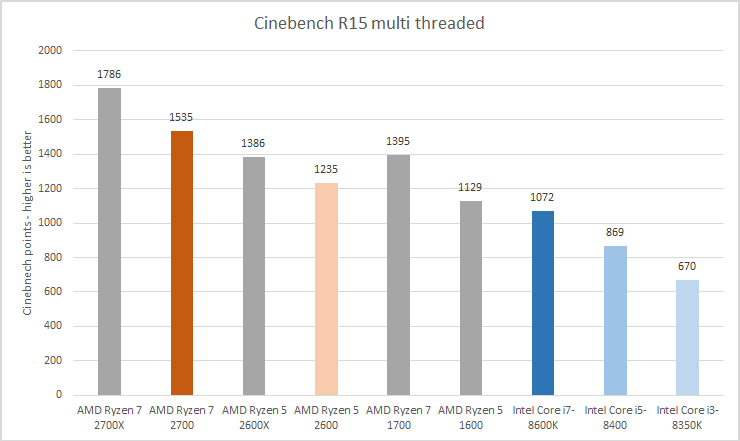
We started out testing with the ever reliable Cinebench R15, whichgives a very consistent measure of raw CPU speed. It provides both a single-core and multi-core test.
Looking at the results for the single-core test and the clock speed advantage of Intel’s processors is clear to see, with all three rival chips coming out on top.
However, it’s a complete role reversal when it comes to the multi-threaded test. Here, AMD’s advantage in the number of cores means its chips pull out massive leads.
Next we ran the render test in POV-Ray, which is another very reliable test of both single-core and multi-core workloads.
In the single-core test, we again see the small advantage in single-core performance for Intel then a big flip round for the multi-core test.
Gaming
As for gaming, this is where clock speed is still king. We largely see results that reflect Intel’s overall single-core speed advantage.
However, notably, this advantage is only at all significant at lower resolutions, where the graphics card isn’t otherwise the performance bottleneck. In the 1440p test with Deus Ex: Mankind Divided, for instance, the difference is less than 2.6fps across all five processors.
Even at 1080p, this only increases to 22.5fps. This isn’t to be sniffed at, but considering all the processors were delivering well over 100fps, those dropped frames per second are felt far less acutely than they would be if the overall average were much lower.
It’s a similar story in Rise of the Tomb Raider, with a very small difference in performance at higher resolutions. However, there’s more of a wild variation at lower resolutions, so much so that the results were a little bit anomolous – the 8350K shouldn’t really be quicker than the 8600K, but there’s enough of a pattern to get the general idea: if gaming is your priority then any of the Intel processors tested here will be a better choice than the 2700 or 2600.
Overclocking
One of the key things AMD has been keen to flaunt with its latest processors is that they’re all multiplier unlocked and so are easy to overclock. However, in actuality, this is of very limited benefit.
In our tests we struggled to get either the 2700 or 2600 running all cores at the same frequency as their single-core boost, meaning single-core performance, and thus gaming performance, wasn’t improved.
Now, there are reports of these chips merrily being overclocked to beyond 5GHz in extreme situations, but at sensible voltages and temperatures, they just don’t seem to deliver the goods.
In fact, we’d almost go so far as to say that you shouldn’t really think about overclocking these chips as a matter of course, but rather think of overclocking potential as a little extra that you can gamble on.
In contrast, if you buy any of the Intel 8700K, 8600K or 8350K then you can all but guarantee they’ll run at 4.8GHz without any extra voltage, so long as you’ve got a decent cooler. For the 8700K this is only a small upgrade, but for the 8600K and 8350K that’s a big bump up in performance, making them potential bargains.
Why buy the AMD Ryzen 2700 or 2600?
These are both great-value processors, ideal for heavy-duty workstations where heavy multi-tasking or multi-threaded workloads are the norm. They absolutely obliterate the competition from Intel for such tasks. They’re also perfectly adequate for anything else, including gaming.
However, there’s no getting round the fact that AMD just can’t keep pace with Intel for clock speed, so when it comes to single-core tasks – including gaming – Intel’s competing offerings will prove a better choice.
AMD should have been able to counter this basic fact with the offer of easy overclocking, but these chips just don’t stretch far enough to make up the gap. As such, it depends where your priorities lie.
As compared to the faster 2700X and 2600X, both chips make a solid case for themselves. The lower base clock speed of the 2700 does hold it back, but then it’s £90 cheaper than the 2700X.
Meanwhile, the 2600X is only £30 more than the 2600, but its reasonably high base clock means it delivers consistent performance.
Verdict
It’s the same old story. AMD’s latest chips are great value for certain tasks but less so for others. You get masses of multi-thread performance, but single-thread and gaming performance trails Intel’s rival processors a little.
Graphic card review and test
What is the Nvidia GeForce GTX 1070 Ti?
The GTX 1070 Ti is one of Nvidia’s weirder cards. Sitting between the 4K-focused GTX 1080 and mid-level GTX 1070, the new Ti feels a little like a play to make a quick buck before the end of the year, using cobbled-together spare parts.
The feeling isn’t helped by Nvidia’s marketing, which pitches the card as being tailor made for 1440p gaming and virtual reality, two areas it originally pitched the 1070 as covering. Times change, of course, but it’s been 18 months since the GTX 1070 originally launched so that’s quite a wait.
But if you take the time to delve a little deeper you’ll find the 1070 Ti is actually a pretty interesting beast, and a solid choice for people yet to make the jump to Nvidia’s new Pascal architecture.
The 1070 Ti uses the same Pascal architecture and GP104 GPU as both the 1070 and 1080, but in a different configuration.
Pascal is the successor to Nvidia’s previous Maxwell GPU architecture. It improves on Maxwell using a smaller manufacturing process that reduces the chip’s fabrication nodes from 28 nanometres to 16nm.
The Pascal architecture lets Nvidia stack more transistors onto the smaller piece of silicon, in theory increasing performance while reducing relative power consumption. It’s because of this that the GPU has a reasonable 180W TDP (thermal design power), which is pretty good by Ti standards. In the past, top-end Ti-branded cards have been rather power-hungry.
But that’s old news: the world knows what Pascal is capable of, and the 1070 Ti offers little in terms of surprises.
Outside of this, the 1070 Ti is closer to a GTX 1080 than a GTX 1070 when it comes to specs. The 1070 Ti’s 2432 CUDA core count puts it well ahead of the GTX 1070 (1920 CUDA cores) and just shy of the GTX 1080 (2560 CUDA cores). CUDA cores are the foot soldiers of a GPU that do the majority of the computational heavy lifting.
The 1070 Ti’s 1607MHz clock speed is also far closer to the 1080’s than the 1070’s, which has a slower 1506MHz base clock speed. If you look at the price this makes the Ti pretty reasonable on paper. The Founders Edition of the GTX 1070 Ti will retail for £419 in the UK, making it £60 more expensive than the 1070 and £70 less than GTX 1080.
The only serious compromises you’ll find between it and the 1080 are the 1070 Ti’s slightly slower memory and boost clock speed. The 1070 Ti’s 8GB of GDDR5 memory will run at 8Gbps. The 1080’s 8GB of GDDR5X has a nippier 10Gbps memory speed. Similarly, the 1070 Ti’s 1683MHz boost clock speed puts it behind the 1080’s 1733MHz.
The boost clock speed downgrade will impact how overclockable the 1070 Ti card is, which will impede how much extra performance overclockers and third-party manufacturers will be able to get out of it.
The 10.5-inch, double-height Founders Edition card’s port configuration is also pretty par for the course, featuring three DisplayPorts, plus single HDMI 2.0 and Dual-Link DVI connectors. VR fans looking to use an Oculus Rift or HTC Vive will bemoan the lack of a second HDMI, but a DisplayPort converter will fix the issue fairly easily, and the single connector will cover Microsoft’s new wave of Windows 10 virtual reality headsets.
All in all, this adds up to mean the 1070 Ti is a fairly impressive card that, in our tests, plays AAA games with their graphics maxed in 1440p at over 60fps.
Nvidia GeForce GTX 1070 Ti – Performance
NOTE:We were unable to source an an AMD RX Vega GPU for this review, because AMD conducted a very limited Vega sampling process. From data gathered by other sites, the 1070 Ti slots in between the Vega 56 model (£390) and the 64 (£490). The 1070 Ti is more efficient than both cards, but if purely price is what you’re after, consider the Vega 56.
Testing methodology
I benchmarked the GTX 1070 Ti on our test rig, which has been designed to match the specifications of a standard enthusiast gaming PC. It features the following components:
Motherboard: Asus Z170-Deluxe Processor: Intel Core i5-6600K (overclocked) RAM: Corsair Vengeance 3000MHz, 16GB DDR4 Cooler: NZXT Kraken x62 (supplied by Overclockers UK) PSU: Corsair CX750M SSD: Samsung 850 EVO OS: Windows 10 Pro 64-bit
Graphics cards for comparison
I ran the GTX 1070 Ti head to head with the Founders Edition GTX 1080 and GTX 1070, running games at their maximum settings at 1080p and 1440p resolutions. The tests were conducted with the latest Nvidia drivers and all games were patched to their most recent versions to completely level the playing field.
Ghost Recon Wildlands
Ghost Recon Wildlands is one of the more demanding benchmarks we run, featuring large open environments with more objects to render than can easily be counted. The 1070 Ti performed admirably, with minimal 3-4fps drops on the 1080, but like all current-gen cards it failed to hit the hallowed 60fps count with the game’s graphics set to Ultra.
Rise of the Tomb Raider
Rise of the Tomb Raider’s built-in benchmark tasks your GPU with some demanding lighting and weather effects across a variety of different environments. It’s beginning to show its age, but is still a solid way to gauge performance thanks to its advanced lighting effects.
I ran the benchmark with the game’s graphics maxed out to their highest settings in its DirectX 11 mode. The 1070 Ti offered a solid performance boost over the 1070 at both 1080p and 1440p resolutions, but it fell well short of matching the GTX 1080 at either resolution, however.
Rise of the Tomb Raider 1080p
Rise of the Tomb Raider 1440p
Battlefield 1
The 1070 Ti offered a solid 15fps boost in 1080p and 11fps in 1440p on the 1070, running Battlefield 1. It didn’t match the 1080, which ran the game 7fps faster at 1080p and 9fps in 1440p.
Battlefield 1 1080p
Battlefield 1 1440p
3DMark Fire Strike Ultra
3DMark’s Fire Strike Ultra benchmark doesn’t reflect the demands of any specific game, but it is a good gauge of a GPU’s overall performance, due to its widespread use and robust score library. The 1070 Ti’s 4644 once again places it closer to the 1080 than the 1070 when it comes to performance.
Power efficiency and heat
Power consumption is one area the 1070 Ti loses out out to the 1070. During Fire Strike Ultra the GPU saw a 262.8W peak power consumption and ran at a fairly hot 75°C. The figures put the 1070 Ti on a par with the GTX 1080 which recorded a 268.8W peak power consumption and 76°C temperature. The regular 1070 took in a more modest 240.2W and ran at a cooler 69°C during the same test.
Nvidia GeForce GTX 1070 Ti – Overclocking
Using EVGA’s Precision software I was able to get a stable overclock the GPU to 2000MHz and memory to 8300MHz on the GTX 1070 Ti. The figures aren’t to be sniffed at and managed to raise the card’s performance to GTX 1080 levels on select titles. On Tomb Raider and Battlefield 1 I recorded solid 6fps performance improvements at 1080p.
Beyond that, instability kicked in, but it’s still an impressive result.
If you’re still slumming it on GTX 970 or below and looking to do the jump to 1440p, or want to be able to continue maxing out games graphics settings at Full HD, the GTX 1070 Ti is a decent option.
Offering near-GTX 1080 levels of performance while being £70 cheaper, this is our new recommended mid-range GPU. But with 2018 and a fresh wave of GPUs surely on the horizon, it’s a little late to the market and those who can would do well to hold on a little longer to see what Nvidia and AMD have in the oven for next year.
Verdict
The new benchmark for 1440p gaming, but it’s come along late.